


All-in-One PDF & Docs Reader
3.789.00 Reviews
App Specs
- Version
- 1.1.3
- Updated On
- License
- Free
- Downloads
- 100,000+
- Developer
- OCEAN FEATHER TECHNOLOGY INC
- Categories
- Productivity
- Platform
- Android
Screenshots
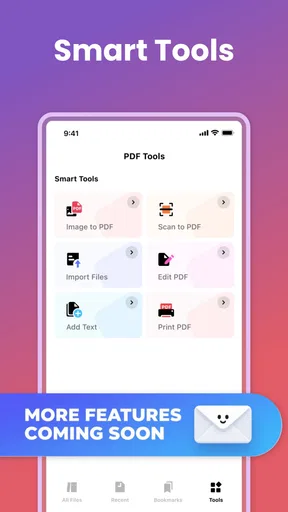
 Analysis by AppCompare
When a document app becomes part of a shared household device, the important question is not only whether it opens PDFs. It also has to fit different reading habits, prevent avoidable confusion between users, and remain simple enough for someone who only needs to check a form once in a while. I tested All-in-One PDF & Docs Reader with that practical situation in mind. It is a free productivity app from OCEAN FEATHER TECHNOLOGY INC, built around reading and managing documents rather than creating a complicated office environment.
My first impression was that its appeal is straightforward: it gives a household a single place to handle everyday files instead of switching between a browser, a file manager, and separate document viewers. That sounds modest, but it matters when one person is opening a school notice, another is checking a work attachment, and someone else needs to read a PDF received in a message. The app’s store summary calls it a document reading and management assistant, while its short description presents it as a PDF and Docs reader. In practice, that focus makes sense. It is most useful when the main task is finding, opening, and reading files without turning the phone into a full desktop-style document suite.
How it fits a shared household device
A realistic use case is a family tablet kept in a common room. One adult downloads a utility document, a teenager opens a class handout, and another household member checks a form sent by email. With a regular file viewer, those tasks can become scattered across download folders and different apps. A dedicated reader can make the routine feel more consistent because everyone knows where to begin: open the document app, locate the file, and read it there.
I would not describe this as a complete household workspace, though. Its value is in document access, not in coordinating people. It does not replace a shared calendar, a family notes system, or a cloud folder with carefully arranged permissions. That distinction is important. If your household needs everyone to edit the same file, assign tasks, or see a clear history of changes, a collaborative office platform is a better fit. This app is more comfortable as the reading layer in that setup.
The strongest shared-device benefit is reduced app hunting. A person who is not confident with file management can recognize the purpose immediately: this is where documents are opened. That is especially helpful for occasional users who do not want to learn the differences between several PDF tools. The trade-off is that a common device can still contain files belonging to different people. A reader can organize access to documents, but it should not be mistaken for a privacy boundary between household members.
For that reason, I would use it alongside sensible device habits. Each person should close a document when finished, avoid leaving sensitive paperwork visible, and use the operating system’s own user or lock features where available. Those protections come from the device environment, not from assuming that a document reader automatically separates family members. This is one of the easiest details to overlook when an app is shared casually.
What the reading experience is good at
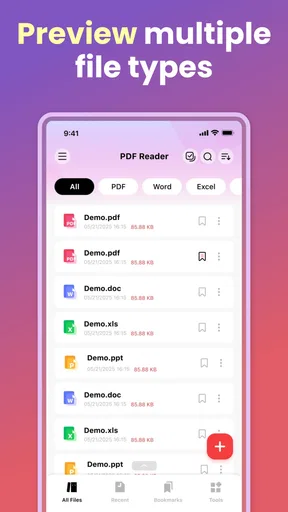
The app is at its best when I need to read rather than edit. A PDF notice, an instruction sheet, a receipt, or a reference document can all be handled in the same general workflow. The emphasis on reading keeps the experience more approachable than opening a broad office suite that presents editing tools before I even know whether I need them.
Worth Reading Before You Choose

EA SPORTS FC Mobile 26 Is a Bigger Football Game, but It Takes Time

Flipboard Shows What News Apps Must Do Beyond the Feed

Switching to Android Auto Means Rethinking Your Driving Routine

Google Calendar Makes a Crowded Week Easier to Manage

Ludo King Makes the Most of the Minutes Between Plans

Baby Panda World Brings Quick Play to Modern Phones, but Its Game Library Feels Busy
That simplicity also makes it suitable for a mixed household. Someone who reads documents every day may appreciate having a familiar place for them, while someone who only opens a file occasionally is less likely to feel overwhelmed. The app is free and rated for Everyone, so its general audience is broad. Still, an Everyone age label is not a substitute for adult judgment about the actual files being opened on a shared device. Financial records, medical paperwork, and identity documents deserve more care than a school timetable, regardless of the application’s age classification.
One practical habit I recommend is separating “read now” from “keep for later” in your wider file routine. Do not let every downloaded PDF remain in the same crowded location simply because the reader can open it. After checking a temporary document, delete it or move it to the appropriate device folder. This makes the app easier to use over time and reduces the chance that another household member opens the wrong file by mistake.
Setup boundaries and everyday organization
Getting started should be viewed as a personal-device decision, even though the app itself is designed for document handling. Before placing it on a shared phone or tablet, I would decide who is expected to use the device and what kind of documents may appear there. That small conversation prevents an ordinary reader from being treated like a private vault.
The current release is version 1.1.3, and it runs on Android 8.0 or later. That makes compatibility fairly approachable for older Android hardware, which is useful if the household keeps an older tablet for reading. At the same time, older devices can have their own storage and performance limitations. A document app may be compatible with the operating system while the overall experience still depends on how much free space and memory the device has available.
I would also avoid assuming that installing the app is the same as importing every document a household owns. A cleaner approach is to begin with a small set of files, check how they appear in the app, and then decide whether it suits the family’s normal folders. This is a useful test for anyone who has accumulated years of downloads. If locating a particular file is still difficult, the real problem may be the device’s storage structure rather than the reader itself.
One of the less obvious trade-offs with all-in-one readers is the balance between convenience and clutter. Having one app for PDFs and other documents is convenient, but a single library can become confusing when work files, homework, travel papers, and personal records are mixed together. I would create a simple naming habit outside the app: use recognizable filenames and move long-term documents into clearly labeled folders. That makes the reader more effective without pretending that it can solve every organization problem automatically.
Another useful workflow is to treat the app as the final step after receiving a file. For example, if a document arrives through messaging, first decide whether it is temporary or worth keeping. Open it in the reader for a quick check, then either remove it or place it in a deliberate folder. This avoids building a hidden archive of duplicate attachments. The tip is particularly valuable on family devices, where repeated downloads can make it difficult to tell which copy is current.
Where it differs from familiar alternatives
Many people already read PDFs through a browser, an email app, or the default file manager. Those options are perfectly adequate for one-off viewing. I would choose All-in-One PDF & Docs Reader when documents are a regular part of my routine and I want a more focused destination for them. The difference is less about replacing every existing tool and more about reducing the number of places I have to remember.
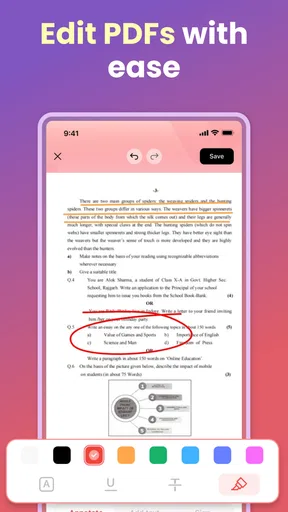
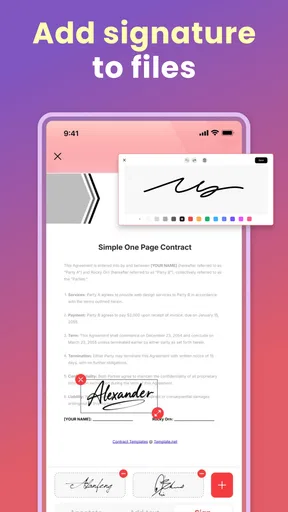
A dedicated PDF editor is the better choice when I need to modify text, fill sophisticated forms, add signatures, or mark up a document in detail. A cloud office suite is stronger when several people need to work on the same file and keep changes synchronized. A basic file manager may be preferable for someone who wants direct control over folders and does not need a separate reading environment. This app sits between those choices: more focused than a general file browser, but not something I would select as a complete document production system.
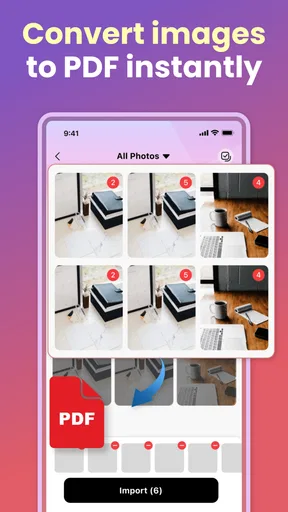
That middle position can be a strength for a household. Not every reader wants editing controls, collaboration panels, and account prompts competing with the page. It can also be a weakness for power users who expect advanced document workflows. If your work depends on annotations, revisions, signatures, or conversion tasks, check your requirements before making it the main document tool. Its strongest case is ordinary access and management, not professional document authoring.
Coordination without confusing ownership
Shared devices create a subtle coordination problem: people often remember that a file was opened, but not where it came from or who still needs it. I found that a simple household convention helps more than trying to make the app carry that responsibility. For example, after reading a document, the person using the device can tell the next user whether it is a temporary file, a reference file, or something that still needs action.
This is especially useful for practical paperwork. Imagine an insurance document downloaded in the afternoon and a school permission form received later the same day. Both may be PDFs, but they belong to different people and have different levels of urgency. The reader can display them, yet it cannot replace a household agreement about who owns the next step. I would keep the action itself in a calendar or notes app and use this reader for the document content.
A good coordination trick is to avoid leaving a document open on the shared screen. Close it after reading and return to a neutral point on the device. This is not a glamorous feature, but it prevents the next person from seeing a private page by accident. It also makes the device feel genuinely shared rather than silently belonging to whoever used it last.
If several people use the same app on separate devices, consistency becomes more important than trying to force everyone into one account structure. Use the same folder naming approach, explain where permanent documents live, and keep temporary downloads separate. Whether the app supports a particular synchronization method is not something I would assume from its role as a reader. For sensitive or important material, confirm how your chosen storage system handles sharing before relying on it.
The app’s popularity is respectable without being overwhelming: it has more than a hundred thousand installs, an average rating of 3.7, and several hundred ratings. I read that as a sign of practical interest rather than proof that it will suit every household. A score in that range suggests a mixed experience is possible, so I would test it with the types of documents the family actually uses instead of judging it only by the store presence.
Age, trust, and the limits of a shared reader
The Everyone content rating makes the app approachable for general household use, but the documents themselves are the important part. A child may be able to open the same reader as an adult, yet that does not mean every file on a common tablet should be available to them. The safest arrangement is to keep sensitive documents on a personal, locked device or within the operating system’s own separate user space when that option exists.
This matters because document apps can make access feel deceptively harmless. A PDF is only a file format, but it may contain a passport scan, a payslip, a medical letter, or a private message. I would not install this reader on a shared device and then rely on the app alone to protect those materials. Trust should be based on device boundaries and household habits, not on the friendly appearance of a productivity tool.
For younger users, the app can be useful for reading age-appropriate worksheets, manuals, or school documents. I would still show them how to identify the filename, close the file, and avoid deleting items they do not recognize. Those instructions are more valuable than simply telling them that the app is easy. They teach document responsibility and reduce accidental changes to a shared collection.
Adults should also remember that an Everyone rating says something about the app’s general suitability, not about whether every document is suitable for every person. This distinction is easy to explain and helps avoid misplaced confidence. The reader can be part of a family setup, but it should not be the mechanism used to decide who may see confidential information.
Who should use it, and who should skip it
I would recommend this app to someone who regularly receives PDFs and other documents, wants one focused reading destination, and does not need a heavy editing suite. It is also a reasonable choice for an older Android device used mainly for reference material, provided the device meets the Android requirement and has enough room for the household’s files.
It makes particular sense for a shared tablet that handles low-risk documents: recipes, public instructions, school handouts, travel confirmations, and manuals. In that setting, its free price removes an obvious barrier, and the reading-first purpose keeps the workflow understandable for different members of the household.
I would skip it as my primary solution if I needed dependable collaboration, sophisticated editing, detailed annotation, or strict separation between multiple personal accounts. In those cases, I would choose a dedicated editor, a cloud office platform, or a device setup with stronger user boundaries. I would also look elsewhere if my main goal were advanced file administration rather than reading, because a traditional file manager may offer more direct control.
There is another reason to be selective: a single app does not automatically make a scattered document collection organized. If your files are already stored across messaging apps, browser downloads, cloud folders, and email attachments, installing a reader may improve access but not solve the underlying mess. Take a few minutes to decide where important documents should live. The app works better when it is part of a clear routine.
My household verdict
After looking at it as a shared-device tool, I see All-in-One PDF & Docs Reader as a practical, modest choice rather than an all-purpose family office. Its strongest quality is focus. It gives ordinary document reading a clear home and can reduce the friction of opening PDFs and related files from several different situations.
The free price and broad Everyone rating make it easy to try, while the Android 8.0 minimum keeps it relevant for households that are not using the newest hardware. The developer, OCEAN FEATHER TECHNOLOGY INC, has positioned it in the productivity space, and that description fits better than calling it an editor or collaboration platform. I would begin with non-sensitive documents, see whether the library remains understandable, and then decide whether it deserves a permanent place on the device.
My main caution is about boundaries. The app can help people access documents, but it should not be treated as a private account system, a family organizer, or a replacement for device security. On a personal phone, that limitation is less noticeable. On a tablet passed between several people, it becomes central. A few simple habits—clear folders, careful filenames, closing files, and keeping confidential paperwork elsewhere—make a much bigger difference than any single convenience feature.
Overall, I would recommend it to households that want a straightforward document reader and understand what it is not trying to be. It is a sensible everyday companion for reading and managing routine files, especially when the alternative is repeatedly searching through browsers and download folders. Choose it for focused access, not for privacy management or full document collaboration, and it becomes a more useful and trustworthy part of a shared-device setup.
Pros
- Opens PDFs
- Word files
- spreadsheets
- and presentations in one app.
- Built-in file manager makes documents easy to browse and organize.
- Supports offline reading without requiring a constant internet connection.
- Useful search tools help locate text quickly in longer documents.
- Can reduce the need for several separate document-reading apps.
Cons
- Some advanced tools may require a premium subscription.
- Large or complex files can take longer to load on older devices.
- The interface may feel crowded because it combines many document features.
- Editing capabilities may be more limited than dedicated office apps.
- Ads or upgrade prompts can interrupt the free reading experience.
FAQs for All-in-One PDF & Docs Reader
What is All-in-One PDF & Docs Reader used for?
All-in-One PDF & Docs Reader is designed to open, read, and manage common document formats from one mobile app. It is mainly useful for viewing PDF files, Word documents, spreadsheets, presentations, and other supported files without switching between several applications. Depending on the version, it may also include tools for searching text, bookmarking pages, sharing documents, and organizing files stored on your device.
Which document formats does All-in-One PDF & Docs Reader support?
The application is primarily intended for PDF documents and may also support popular office formats such as DOC, DOCX, XLS, XLSX, PPT, and PPTX, along with text or image files. However, compatibility can vary according to the operating system, app version, and document complexity. Before downloading, users who work with specialized formats should check the store listing to confirm that their files are supported correctly.
Can I use All-in-One PDF & Docs Reader without an internet connection?
Many basic reading functions work offline after a document has been downloaded or saved on the device. This makes the app convenient for reading PDFs or office files while traveling, in areas with weak connectivity, or when mobile data should be conserved. Internet access may still be required for cloud storage, online file imports, advertisements, updates, synchronization, or any feature that depends on an external service.
Does the app allow users to edit, annotate, or convert documents?
All-in-One PDF & Docs Reader focuses primarily on document viewing and file management, but some versions may provide additional tools such as highlighting, drawing, adding notes, filling forms, signing PDFs, converting files, or extracting pages. These features are not always included in the free version and may be limited by the document type. Review the current feature list before relying on it for advanced editing.
Is All-in-One PDF & Docs Reader safe and suitable for private documents?
The app can be useful for opening personal and work files, but users should review its permissions and privacy policy before importing sensitive information. Avoid granting access that is not necessary, and be cautious when using cloud, sharing, scanning, or conversion features because files may be processed outside the device. For confidential documents, confirm how data is stored, transmitted, and deleted before using the application.


